Welcome to the Single Board Cluster Competition 2025.
This site will contain all relevant info for competitors in terms of submissions and other logistics. For time-based announcements this site will reflect it when the time rolls over according to PST -- teams in forward time zones will be notified of specifics according to their local timezone.
The Single-Board Cluster Competition (SBCC) is a competition where teams from all around the world compete using single-board devices, and other similarly simple hardware, to create miniature supercomputing clusters. SBCC25 is the third competition.
Schedule
Agenda:
| DAY | START | END | ACTIVITY |
|---|---|---|---|
| Thurs | 8:00 am PST | 5:00 pm PST | Setup |
| Friday | 8:00 am PST | 1:00 pm PST | Benchmarking |
| Friday | 12:00 pm PST | 5:00 pm PST | Competition Begins - Applications |
| Saturday | 8:00 am PST | 3:00 pm PST | Final Submissions Due |
| Saturday | 5:00 pm PST | Awards Ceremony |
Notice that you can submit benchmarks one hour after application details are revealed. Here is the FULL schedule
FAQ
What is the bugdet for the hardware?
- 6000 USD, Use american MSRP for hardware cost when possible.
What is the power budget for the cluster?
- 250 Watts
Are eGPUs allowed?
- Yes
Does a DHCP server count as part of the cluster?
- No, given that it is only used for managing the cluster network / accessing the cluster.
Can we use LLMs during the competition?
- Yes. Only sharing information and getting advice from with mentors and individuals outside the competition should be avoided/not done. Communication in between teams and judges is allowed. Teams may also access the internet on their own computers, but not speak about the competition to others.
Teams
- University of California, San Diego - Team 1
- University of California, San Diego - Team 2
- Aalborg University
- Texas Tech University
Teams list
| MODE | ORG | LOCATION | SYSTEM | TEAM MEMBERS |
|---|---|---|---|---|
| Remote | USCD | La Jolla, CA | Radxa Rock Pi 5B | Aarush Mehrotra, Gauri Renjith, Ferrari Guan, Luiz Gurrola, Ryan Estanislao, Shing Hung, William Wu and Minh Quach |
| Remote | USCD | La Jolla, CA | Raspberry Pi 4B | Cecilia Li, Ian Webster, Yixuan Li, Jackson Yang, George Mathews, Zyanya Rios, Chanyoung Park and Srujam Dave |
| Remote | AAU | Aalborg, DK | Jetson Orin Nano Super | Sofie Finnes Øvrelid, Thomas Møller Jensen, Brian Ellingsgaard and Tobias Sønder Nielsen |
| Remote | TTU | Lubbock, TX | Radxa X4 | Chidiogo Obianyor, Ethan Holman, Roy Garza, Tannar Mitchell, Oluwatobiloba Ajani Isaac and Batuhan Sencer |
| Remote | CU | Clemson, SC | Raspberry Pi 4 | Erin Wood, Jacob Davis, Ethan Prevuznak, Tolga Bilgis, Keerthi Surisetty, Yagiz Doner, Lane Ireland and Chloe Crozier |
| Remote | KU | Lawrence, KS | Orange Pi 5/5+ | Michael Oliver, Wazeen Hoq, Shaan Bawa, Ky Q Le and Leo Cabezas Amigo |
San Diego Super Computing Center / University of California, San Diego - Team 1
Diagram
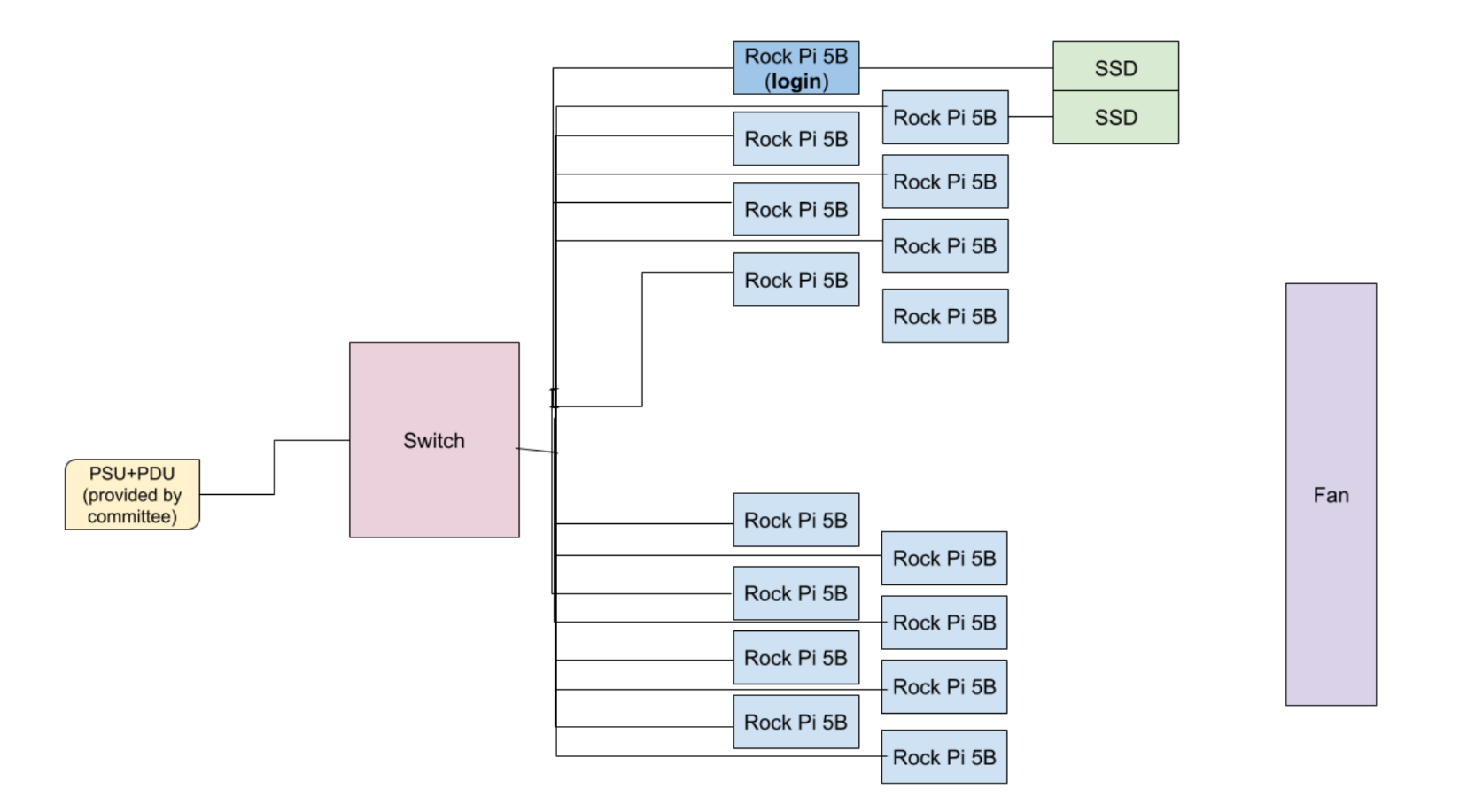
Hardware
- 16 Rock 5Bs
- Each is connected to Unifi2Standard 48 ethernet switch via a cat6 ethernet cable
- Each is connected to an extension cord by USB-C power supply
- Extension cords will be connected to PSU+PDU
- For oMPI compatibility, every Rock 5B will be able to SSH into each other before we get to the competition, saving us competition time
- 2x MV-V7E500 500GB SSDs (1 TB total)
- 1 SSD will be on the login node, while the other will be on a different node (we may call this the secondary login node)
- Cluster compute structure: Primary access through a login node structure, which will have important storage/accessories locally connected (vs. virtual access)
| Part | Units | Wattage/Unit | Cost per unit | Tax/Shipping | Anticipated Tariff | Total Price |
|---|---|---|---|---|---|---|
| RADXA Rock Pi 5B (16 Gb RAM) | 16 | 12 | 117.90 | 148.00 | 0.25 | $2,506.00 |
| Unifi Switch 48 | 1 | 40 | 400.00 | $400.00 | ||
| MV-V7E500 500GB SSD | 2 | 150.00 | $300.00 | |||
| Enclosure (DIY) | 1 | 79.92 | $79.92 | |||
| Power supply | 16 | 11.2 | 20.72 | 0.25 | $244.72 | |
| Fan | 4 | 1.56 | 6.99 | $27.96 | ||
| TOTAL COST | $3,558.60 |
Software
Filesystem & Storage
- SSDs will be configured with RAID0 for better read/write speeds
- Ceph will be used a network file system since members of the team have past experience working with it and setting it up on clusters
- This will allow every node to efficiently access data without bottlenecking the applications, and provide the bandwidth we need for I/O libraries required in our applications and benchmarks
- Ceph is a POSIX-compliant file system notable for how it splits metadata and data into separate data stores, allowing more efficient writes and collaboration between users. We believe this will be especially helpful for I/O focused applications and benchmarks like STREAM, allowing us to maximize performance
- Ceph is widely used in industry, is an open-source platform, and has large amounts of documentation and research available for our team to make use of.
Networking
- Networking will be set up with IPMI/BMC
- We will use the pre-configured network settings on the switch
Sysadmin, OS, and Setup
- The cluster will run on Debian, using an official image from Radxa.
- We will set up users and privileges through Ansible:
- Standardize our setup process, including building on playbooks developed for club hardware and projects.
- A convenient way to set up the preliminary software stack.
- This will allow us to easily reset any system without repercussion if we need to reset a system.
- We will try strongly to set up Slurm on the cluster so that we can schedule tasks overnight when we’re away from the machines:
- Since we are a large team, it will be easier to manage resources with Slurm as well.
- We will follow standard processes, like disabling password-based logins (among other choices), to ensure cluster security.
- If time permits, we’ll look into setting up a logger and optimizing CPU clock speeds.
- GCC compiler.
- Spack to manage and install dependencies for all users.
- Grafana dashboard to profile cluster.
- Prometheus and Docker to query data from the provided PDU.
Application and Benchmark Specific Dependencies
- STREAM: stream_mpi in Fortran or C, ssh config, mpicc, mpirun
- Hashcat: libOpenCL.so on POCL
- D-LLAMA: git, Python 3
- HPL: Standard BLAS implementation, as there are no vendor-optimized versions of this library
Team Details
Aarush Mehrotra: Aarush Mehrotra is this year’s SBCC team captain. He is a double-major in Mathematics-Computer Science and Economics. He is currently an HPC Intern at SDSC. With prior SBCC and SCC experience, he brings institutional knowledge and real-world experience to the team. Aarush has experience working with machine learning benchmarks, scientific applications, and various other HPC tools. He looks forward to competing and making friends at SBCC25.
Gauri Renjith: Gauri has prior experience using high performance computing to perform genome-wide association analyses of genetic information. As a computer science major specializing in bioinformatics, she provides a unique perspective on HPC applications and is excited to explore supercomputing and its usage to understand biological problems.
Ferrari Guan: Ferrari has prior experience in high-performance computing (HPC) as a network specialist and system administrator for the SCC team. As a computer engineering major, he has experience working on the hardware, the software, and everything in between. He is enthusiastic about building HPC cyberinfrastructure and solving real-world problems.
Luiz Gurrola: Luiz Gurrola has prior experience in high performance computing through SBCC as well as experience in system administration. He is interested in all fields relating to computer science and computation and is eager to improve and apply his skills.
Ryan Estanislao: Ryan has prior experience in high performance computing through last year’s SCC Home Team, analyzing runtimes on the ICON application. As a computer science major, he is interested in further understanding how to make various applications more efficient.
Shing Hung: Shing has prior experience constructing a Raspberry PI-based CPU cluster with Ceph, and conducting read/write and video streaming benchmarks through her past internship. She is excited to explore more on embedded system programming, hardware coding, and firmware design.
William Wu: William has prior experience working with hardware like Arduinos and Raspberry Pi when automating tasks for lab work. He has also competed nationally in cyber competitions and can transfer many of his skills into working on Hashcat.
Minh Quach: Minh has prior experience working with system optimization and embedded systems. She has worked on Jetson Nano-based projects, optimizing real-time computer vision applications and managing resource-constrained devices. As a computer engineering student, she is eager to apply her knowledge to building and optimizing single-board computer clusters and tackling real-world HPC challenges.
San Diego Super Computing Center / University of California, San Diego - Team Curtesy
Diagram
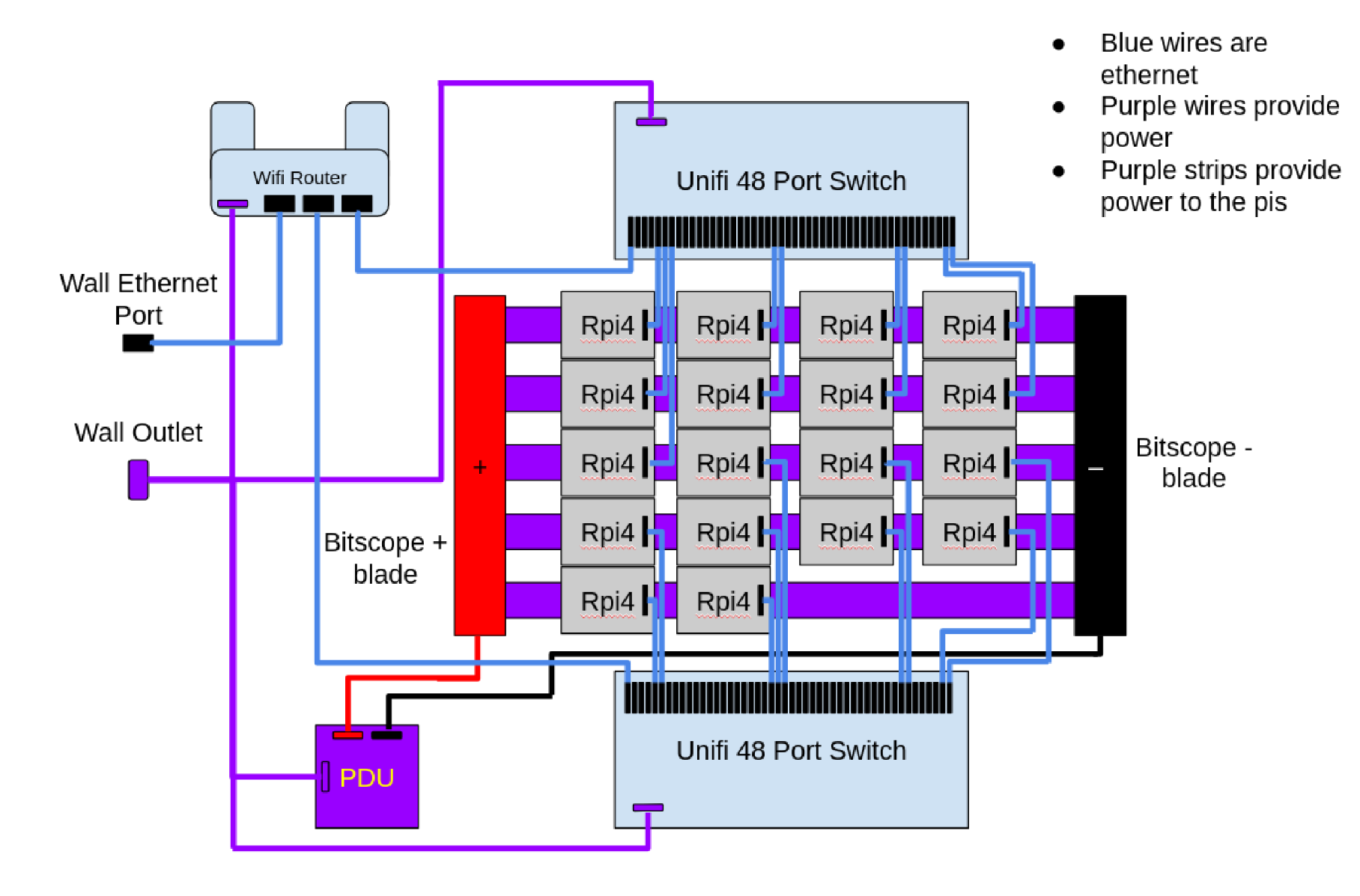
Hardware
- Bitscope blades provide power to pis via GPIO pins.
- Pis communicate via ethernet through switches.
- One pi acting as the designated head node.
- Access the head node pi through the router from the internet, and access the other pis via ssh from the head pi
Budget Breakdown
| Part | Units | Cost per unit | Shipping | Total Price | Supplier | Link |
|---|---|---|---|---|---|---|
| Raspberry Pi 4B | 18 | $75 | $13.48 | $1,363 | Pi Shop US | Link |
| PNY 64Gb MicroSD | 18 | $5.33 | $0 | $95.94 | Amazon | Link |
| Unifi Switch 48 | 2 | $589 | $11 | $1,189.00 | Unifi | Link |
| Bitscope Rack | 1 | $945.25 | $52.82 | $998.07 | Bitscope | Link |
| Power supply | 1 | $89.99 | $0 | $89.99 | Amazon | Link |
| Fan | 1 | $58.99 | $0.00 | $58.99 | Amazon | Link |
| 1ft Cat6 ethernet cables | 18 | $1.59 | $14.76 | $43.38 | Cables for less | Link |
| Wifi Router | 1 | $86.90 | 0 | $86.90 | Gl-inet | Link |
| Long Ethernet cables | 3 | $9.79 | 0 | $29.37 | Amazon | Link |
| USB-C Power cable | 1 | $15.99 | 0 | $15.99 | Amazon | Link |
| Power Strip | 1 | $12.99 | 0 | $12.99 | Amazon | Link |
| Power Cables | 3 | $6.09 | 0 | $18.27 | Amazon | Link |
| TOTAL COST | $3,795.47 |
Software
We first installed Ansible and wrote Ansible scripts to set up users and distribute ssh keys throughout the pi network to enable passwordless communication. We installed Slurm as our job scheduler, GCC for compiling, Openmpi for multinode interfacing when running tasks, spack for package management, and nfs-utils for sharing files across nodes.
Team Details
Cecilia Li-First-year Electrical Engineering student. Working on sysadmin, STREAM, and Hashcat. I will also be running the mystery app during the competition. I’m interested in circuits and systems, signals and imaging, and ML.
Chanyoung Park-Second year Data Science student. Working on DLLAMA and Hashcat. Interested in Data Analysis, Image Processing, and ML.
George Mathews-First year Computer Engineering student working on HPL, helping with hashcat and power + monitoring.
Ian Webster-Second year NanoEngineering student. Working on STREAM and Sysadmin.
Jackson Yang-Third year Computer Engineering student working on DLLAMA and networking, power + monitoring. I am interested in Security, Networking, and architecture.
Srujam Dave-Second year Computer Engineering student. Working on HPL and Hashcat. Interested in networking and computer architecture, and excited to learn more through SBCC.
Yixuan Li-First year Computer Science major student working on networking, sysadmin, and dllama.
Zyanya Rios-Second year Computer Engineering student, working on Hashat and STREAM. Interested in cybersecurity and hardware for clusters.
Aalborg University / Aalborg Supercomputer Klub
Diagram
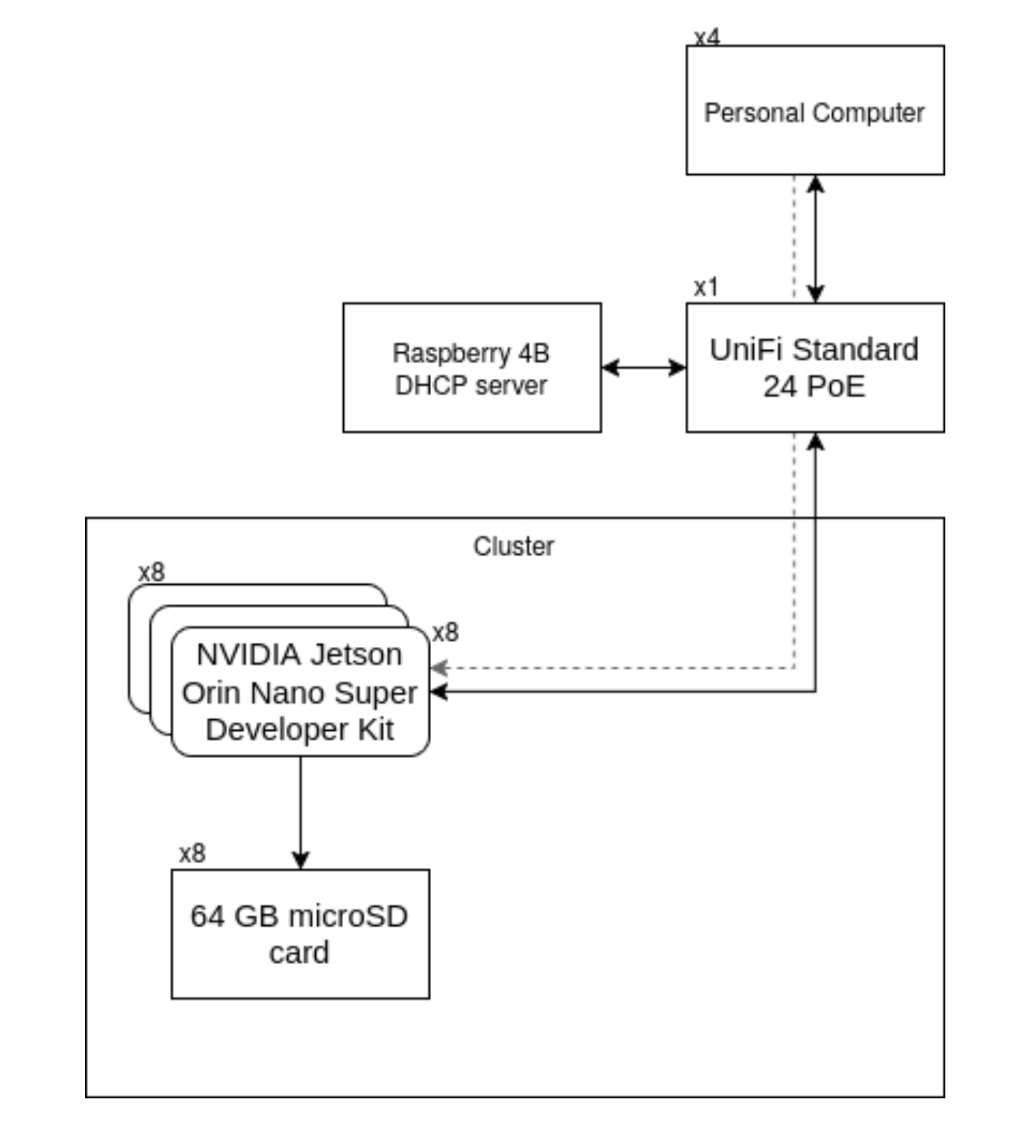
Hardware
All SBC’s will communicate over the switch, a raspberry pi will be used as a DHCP server. We access the SBC’s through the same switch over SSH.
| Name | Description | Price | Amount | Total |
|---|---|---|---|---|
| NVIDIA Jetson Orin Nano Super Developer Kit | Single-board computer | $249.00 | 8 | $1,992.00 |
| Raspberry Pi 4B 4GB | DHCP server and NAT | $60.00 | 1 | $60.00 |
| 2x Amazon Basics microSDXC - 64 GB | SD card (2x per unit) | $1885 | 2 | 37.70 |
| SanDisk Extreme microSDXC - 64GB | SD card | $11.27 | 4 | $45.08 |
| UniFi Standard 24 PoE | Networking switch | $370.00 | 1 | $370.00 |
| Total | $2504.78 |
Software
MPI: mpich LINALG: cuBLAS (GPU primary), blis (CPU backup). COMPILERS: nvcc / mpicc / clang MGMT SOFTWARE: Ansible, OpenSSH Operating System: NVIDIA JetPack 6.x (Ubuntu 22.04 LTS-based)
Strategy
We seek to take advantage of the powerful GPUs on the Jetson boards. Use cuBLAS over CPU-BLAS libraries wherever possible. Work on rewriting challenges to be cuBLAS compatible memory allocations and calls (hopefully). Ensure these implementations are correct + document.
HPL: Use NVIDIA cuBLAS implementation of HPL 2.3. STREAM: Run according to the official run rules using MPI. D-LLAMA 3 8B: Distributed Llama can run on any amount of nodes that is a power of 2, which makes our 8 nodes quite suitable. Hashcat: Hashcat has built-in support for GPU acceleration using CUDA. We plan to split the passwords equally across the 8 nodes, and crack them whenever the nodes are not busy with anything else.
Team Details
Brian Ellingsgaard: 2nd-semester Software student. First year participating in SBCC.
Sofie Finnes Øvreild: 4th semester Software student. Second year participating in SBCC.
Thomas Møller Jensen: 10th semester Software student with a bachelor in Computer Engineering. Second year of participating in SBCC.
Tobias Sønder Nielsen: 4th-semester Software student. Second year participating in SBCC.
Texas Tech University - Team RedRaider
Diagram
Hardware
| Item name | Cost per item | Number of items | Total item cost | Link or Description of the item |
|---|---|---|---|---|
| Radxa SLiM X4L board | $178.86 | 1 | $178.86 | Radxa SLiM X4L board |
| Radxa X4 boards | $21.56 | 20 | $431.20 | Radxa X4 boards |
| Ethernet Switch | $64.95 | 1 | $64.95 | Ethernet Switch |
| Power supply | $13.90 | 22 | $305.80 | Power supply |
| Ethernet cables | $10.00 | 22 | $220.00 | Ethernet cables |
| Power meter | $65.99 | 1 | $65.99 | Power meter |
| Case Fan | $9.00 | 1 | $9.00 | Case Fan |
| Heat sink | $19.95 | 1 | $19.95 | Heat sink |
| GeekPi 8U Server Rack with 4 extra shelves and blanking panels | $299.91 | 1 | $299.91 | GeekPi 8U Server Rack, Extra shelves, Blanking panels |
| Fan Grill 1400mm Guard Black | $9.99 | 1 | $9.99 | Fan Grill |
| 2TB NVMe Drive | $189.90 | 1 | $189.90 | 2TB NVMe Drive |
| NVME Extender | $17.39 | 1 | $17.39 | NVME Extender |
| PWM 4-wire fan temperature controller | $17.99 | 1 | $17.99 | PWM 4-wire fan temperature controller |
| Total | $2,000.92 |
Software
To maximize the performance and efficiency of our cluster, we are utilizing the following software tools:
- MPI Version:
- OpenMPI – v5.0.5
- Linear Algebra Libraries:
- OpenBLAS – v0.3.28 for optimized basic linear algebra operations.
- Compilers:
- GCC – v11.5.0 with optimization flags for x86-based processors.
- Cluster Management Software:
- SLURM (Simple Linux Utility for Resource Management) for job scheduling and resource allocation.
- Spack – v24.05.5.0
- Operating System:
- Rocky Linux 9.5 (Blue Onyx)
Strategy
Benchmarks
-
High Performance Linpack (HPL)
- Installation: HPL is installed using Spack, and OpenBLAS is also installed using Spack. Dependencies are managed within Spack to ensure compatibility and efficiency.
- Configuration:
- The problem size (N) is determined using 80% of total RAM while considering overhead. Based on the formula:
- For Radxa X4 with 8GB RAM, assigning 6GB of the 8GB for HPL, we use N = 38,000.
- For 20 nodes, N is set to 115,000 in HPL.dat to optimize memory utilization across all nodes.
- The block size used is 64.
- For 20 nodes with 4 cores each, we use a process grid of: P = 8, Q = 10.
- Slurm's CPU binding is used to optimize thread placement and prevent core oversubscription. Example command for running HPL on 80 processes:
time -p srun --export=ALL -n 80 ./xhpl
- The problem size (N) is determined using 80% of total RAM while considering overhead. Based on the formula:
- Performance optimization:
- Power settings are adjusted via BIOS or dynamically using powercap-info, setting:
constraint_0_power_limit_uw=5000000 # 5W(default is 6W on the X4)
- The OpenMPI communication between the nodes is adjusted to improve communication overhead.
- The number of OpenBLAS threads is tuned to optimize computational throughput.
- Power settings are adjusted via BIOS or dynamically using powercap-info, setting:
-
STREAM
- Installation and Compilation:
- Installation is done using Spack with GCC, with the source code obtained from the following link: - https://www.cs.virginia.edu/stream/FTP/Code/stream.c
- It is compiled using Spack mpicc:
mpicc -O3 -fopenmp stream.c -o stream_mpi
- Configuration:
- Stream array size is set to the default in the source code, which is 10,000,000.
- Execution and Result monitoring:
- Slurm is used to gather results and verify consistent numbers across multiple runs.
- Installation and Compilation:
-
DLLAMA3
- Installation:
- Install using Spack alongside the OpenBLAS already installed for HPL.
- Using the Spack approach to distribute workloads using MPI.
- Configuration:
- Matrix sizes are still to be decided.
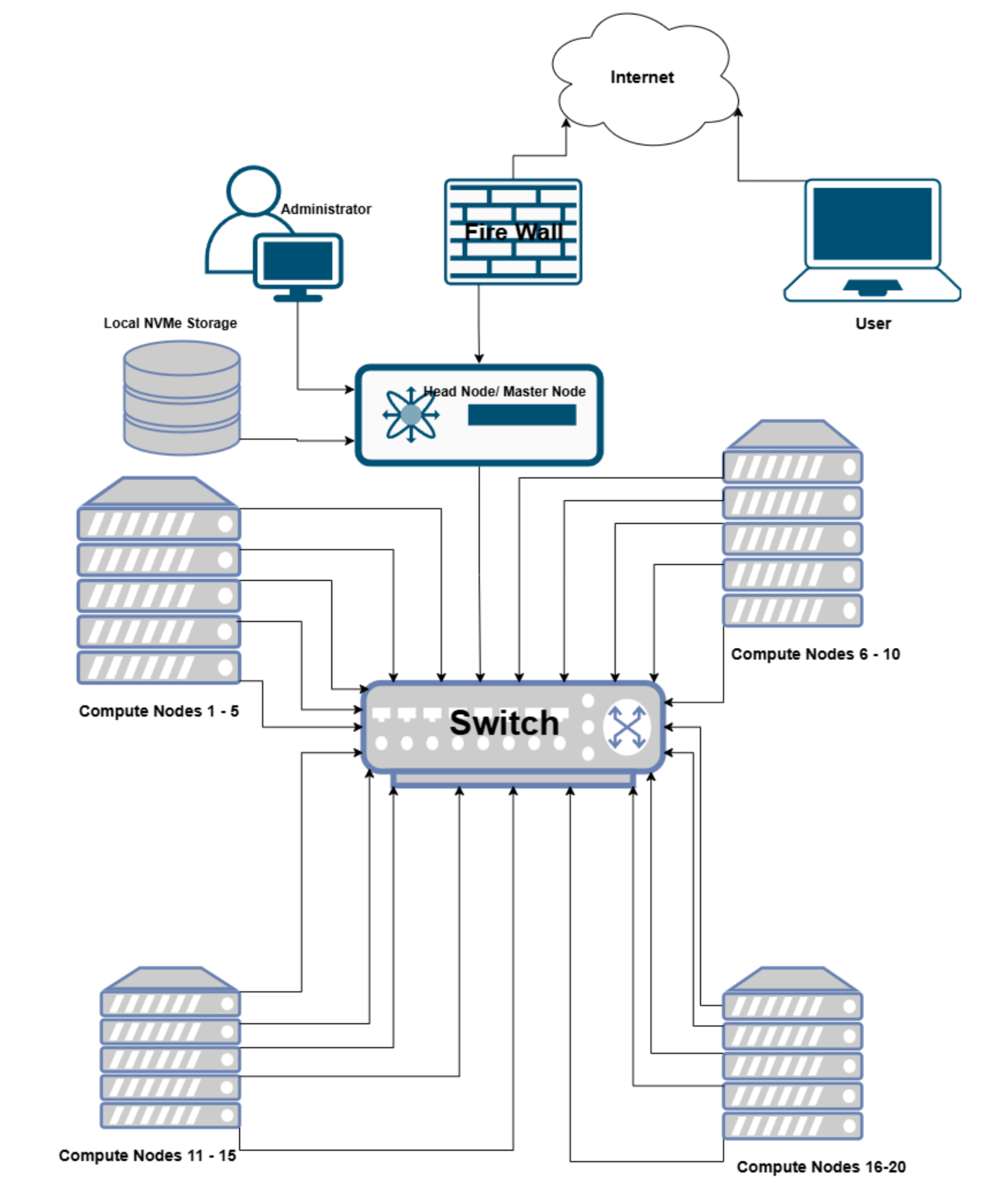
- Storing test data on the Head node’s NVMe drive to ensure minimal I/O overhead.
- Execution:
- The code is executed using SLURM:
srun --mpi=pmi2 -n 80 ./dlaama3_exe
- CPU usage is monitored using Slurm sacct to avoid memory or CPU saturation issues.
- The code is executed using SLURM:
- Installation:
Applications
- Hashcat
- Installation:
- It is built using Spack install, ensuring a CPU-optimized build.
- Configuration:
- Using Slurm, the dictionary will be partitioned across the 80 nodes of the cluster, distributing the workload to run on each node.
- Performance optimization:
- The use of NVMe on the head node as well as the NFS shared file system to avoid memory overheads.
- SLURM sacct, RAPL, and LIKWID will be used to monitor performance, including temperature and CPU frequency.
- Thread concurrency: since the Radxa X4 node has 4 cores, we use 4 threads.
- Installation:
Team Details
Obianyor, Chidiogo – Computer Science senior working on undergraduate research in cybersecurity using a cluster of single board computers (Team Lead).
Roy Garza - Computer Engineering freshman.
Batuhan Sencer - Computer Science – Junior – Has experience with HPL Benchmark(optimization).
Tannar Mitchell – Computer Science – Freshman – I got into HPC through the Winter Classic Invitational Student Cluster Competition.
Ethan Homan – Computer Science Senior working on undergraduate research in cybersecurity using a cluster of single board computers.
Oluwatobiloba Ajani Issac – Information Technology Freshman.
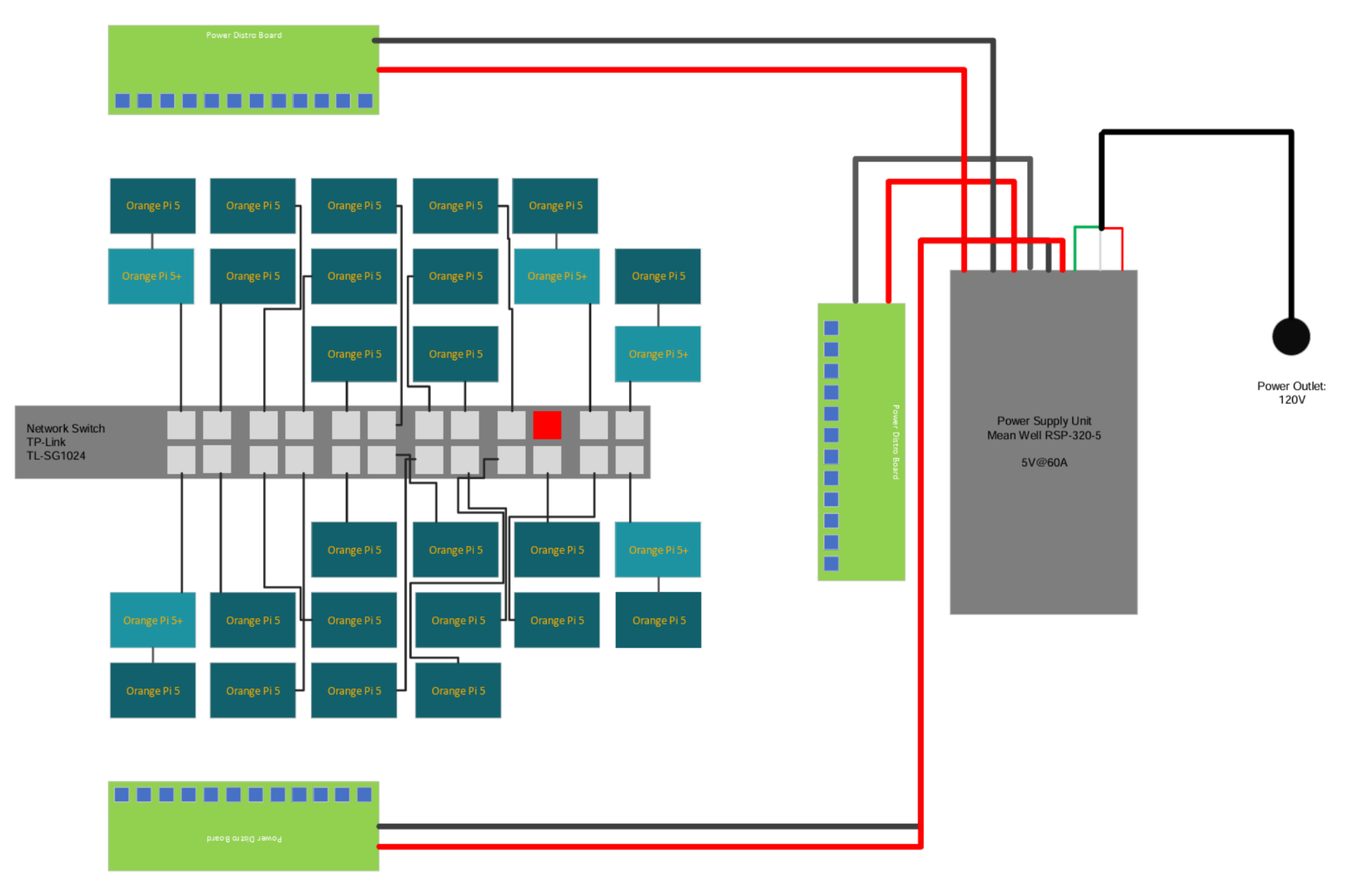
University of Kansas / KU SUPERCOMPUTING CLUB
Diagram
Hardware
| ITEM | COST (per unit) | # ITEMS | TOTAL COST | LINK TO PRODUCT |
|---|---|---|---|---|
| Power Supply | $43.95 | 1 | $43.95 | Link |
| Ethernet Switch | $89.70 | 1 | $89.70 | Link |
| Power Strip | $8.99 | 1 | $8.99 | Link |
| Power Distribution Board | $38.00 | 3 | $114.00 | Link |
| Power Monitor | $15.99 | 1 | $15.99 | Link |
| 64GB MicroSD Card (30-pack) | $139.50 | 1 | $139.50 | Link |
| Orange Pi 5+ | $191.99 | 5 | $959.95 | Link |
| Orange Pi 5 | $139.99 | 23 | $3,219.77 | Link |
| Ethernet cable (grey, 100ft) | $60.00 | 1 | $60.00 | Link |
| M4 Hex Head Screws (100 ct.) | $12.58 | 2 | $25.16 | Link |
| 14AWG supply wires (1 black, 1 red, 50ft each) | $23.16 | 2 | $46.32 | Link |
| 24AWG supply wires (orange, 50ft) | $6.15 | 1 | $6.15 | Link |
| 24AWG supply wires (black, 50ft) | $6.15 | 1 | $6.15 | Link |
| Ethernet RJ45 crimp-on connector (10-pack) | $9.77 | 10 | $97.70 | Link |
| Heatsinks | $7.99 | 15 | $119.85 | Link |
| Din Rails 7.5mm depth | $6.30 | 3 | $18.90 | Link |
| Single Clip Mount for DIN 3 Rail | $2.53 | 30 | $75.90 | Link |
| Clear Plexiglass 18"x36" (1/4") | $30.28 | 1 | $30.28 | Link |
Software
| FEATURE | SOFTWARE USED |
|---|---|
| Operating system | Armbian Linux 24.2.1 Bookworm CLI, Kernel: 5.10 |
| C/C++ compilation | GNU Compiler Collection |
| Job scheduling | Slurm |
| MPI implementation | MPICH |
| BLAS implementation | OpenBLAS |
| Package management | Spack |
Strategy
- HPL: Will experiment with several tuning configurations that consider OpenMP support within OpenBLAS, thus reducing intra-node communication overhead.
- STREAM: We will explore several MPI+OpenMP configurations to achieve maximum memory bandwidth across the cluster.
- D-LLAMA 3 8B: We will compare the performance for different BLAS implementations and determine whether quantization is beneficial given our cluster setup.
- Hashcat: Will research and experiment with application, benchmarking with various hash digests (MD5, SHA256, SHA512). We will also explore using a hybrid cracking technique before moving onto a brute force approach.
- Mystery Application: Will research into the provided application to ensure completion within the allotted timeframe.
Team Details
Our team is comprised of five (5) University of Kansas (KU) undergraduate students that are active members of KU’s Supercomputing Club. Below is the team roster and member backgrounds:
| NAME | BACKGROUND |
|---|---|
| Leo Cabezas | (captain) Junior in Computer Engineering and Mathematics, KU Undergraduate Research Fellow, KU International Excellence Award Scholar. |
| Michael Oliver | McNair Scholar, Senior in Computer Science, System Administrator at Institute for Information Sciences. |
| Shaan Bawa | Freshman in Computer Science, Hixson Scholar. |
| Wazeen Hoq | Sophomore in Behavioral Neuroscience and Mathematics. |
| Ky Le | Senior in Computer Science. |
| Hope Wagner | Freshman in Mechanical Engineering. |
Clemsom University / Team Clemsom CyberTigers
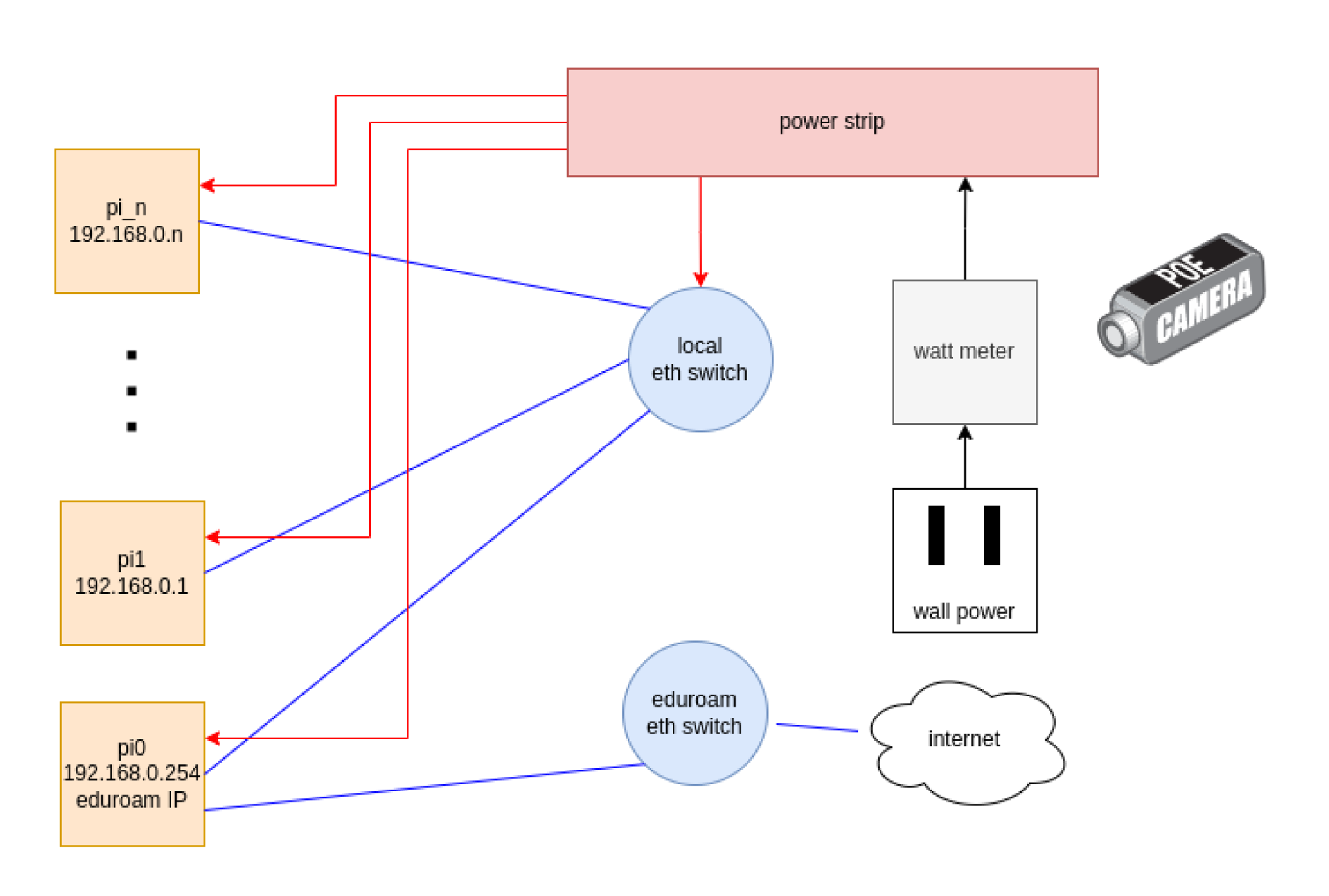
Diagram
Hardware
For this competition, we will be using a Raspberry Pi cluster with N nodes. Raspberry Pi’s are being used due to budget constraints. Since we will be competing from Clemson and not going to the UCSD or TACC hotspots, we will set up a livestream of a digital watt meter that our power strip is plugged into to be sure we do not go above the 250W limit. For internet access, we will be dedicating a single IP on Clemson’s eduroam network for external internet access, and setting up the rest of the Pi’s in a Beowulf configuration such that internet traffic is routed through the head node to each individual device
| Component | Price | # of items | Total cost | Item Link |
|---|---|---|---|---|
| Raspberry Pi 4 | $35 | 20 | $700 | Link |
| NETGEAR 24-Port Gigabit Ethernet Unmanaged Switch (JGS524) | $149.99 | 1 | $149.99 | Link |
| Overall Total | $849.99 |
Software
Our Raspberry Pi’s will be running the latest version of Raspbian, since group members have the most experience using it on these devices. The Raspberry Pi release of Rocky Linux was also considered, but because we are not as familiar with it, we are sticking with Raspbian for this competition.
We have not yet settled on specific management tools for our cluster, but intend to use them because this system has a high node count. The challenge we are dealing with is finding one that supports PXE boot with ARM. The provisioner we use for our Student Cluster Competition system is xCAT, which does not support iPXE with ARM. Online research suggests that Warewulf provides this capability, but we have not confirmed this ourselves on a testbed yet. We currently do not have an Ansible repo or other cluster management system, but instead do all our setup in postscripts after provisioning.
Our software stack will be managed with Spack. Our primary OpenMPI version will 5.0.3, since it is the latest version and Spack preferred. In case of issues, we are prepared to install other versions to suit our needs via Spack. Our linear algebra library will be the Spack preferred version of OpenBLAS, 0.3.26. This is also subject to change if this version has problems when building any of the applications
Strategy
To make sure we do well in this competition, our main strategy will involve being as prepared as possible going in. The hardware we will be using is already in our possession, and we will stand up our cluster as soon as possible. We know all the benchmarks in advance of the competition, and will have them all running and optimized on our cluster before the start of the competition. Come April 10th, all we will have to do is run a script to produce the required results. In case anything goes wrong, all team members will be trained and have experience with each benchmark so they can assist with debugging.
Being able to execute the benchmarks quickly will free up time for us to work on the mystery application. To learn, build and run a new application on the fly, team members will have opportunities to build various popular HPC applications on the Pi Cluster so they build the necessary skills
Team Details
Ethan is a senior (CPE) interested in various realms of computer science, including HPC. He has interned at Hawkes' Learning in 2023 as a development intern for AI solutions to streamline company data, learning valuable research and programming skills in the process. He attended SC24 as an alternate for the Student Cluster Competition team. He will be the team captain of the Single Board Cluster Competition (SBCC) for the 2025 competition. He has applied to partake in a Creative Inquiry over the summer at Clemson as well as the SULI program. Ethan plans on graduating in 2026 and will pursue a Master's degree shortly after.
Yagiz, a freshman majoring in Computer Engineering, is interested in the general hardware aspect of computing. Yagiz was previously involved in a creative inquiry, which can be described as “Clemson University’s unique combination of undergraduate research, experiential learning and cross-disciplinary interactions.”. He participated in this creative inquiry during his first semester of freshman year, specializing in the education of circuits and electronics. In that creative inquiry, Yagiz learned how to solder and identify certain parts of electronic components. He wants to explore various opportunities regarding projects, creative inquiries, research, and internships that will help him learn more about his desired field of practice and contribute to a team. Yagiz wants to stay involved in the hardware and electronics field for his future endeavors as he hopes to pursue a career in hardware engineering.
Jacob is a sophomore (CS) with a double math major interested in scientific computing. Jacob has previously interned with Cadence Design Systems, working on computational software for hardware verification, and he's currently interning with CU-ICAR for machine learning. Jacob is also researching machine learning algorithms, taking graduate coursework in algorithm design and analysis, and plans to pursue at least an M.S. degree after graduation.
Tolga is a freshman majoring in Computer Engineering and is interested in embedded software. Tolga has participated in 2 creative inquiries: XR/VR development and PLM Processes and CAD/CAE Tools with Application to Vehicle Component Design, where he developed a wireless dashboard system for a robotic vehicle. Tolga also developed a plugin for MPV player (popular video player) that dynamically alternates subtitle languages based on the user's language proficiency and is integrated with Anki (SRS flashcard tool). Tolga is also working on building a 4-bit computer from individual transistors.
Benjamin is a senior computer engineering major, and is a veteran cluster competitor. He has competed in the IndySCC in 2022, and the in person SCC in 2023 and 2024. Additionally, he has done two internships at Los Alamos National lab in networking and data storage. He also is the system administrator of a research cluster used by Jon Calhoun’s FTHPC lab and several others. Benjamin has also done HPC research and presented at a workshop at SC23. After graduation, he will do the accelerated Masters program at Clemson, and hopefully work full time at Los Alamos after that. As a senior member of the team, he is looking forward to mentoring new students on the team.
Lane is a senior Computer Engineering major with plans to graduate in 2026. This is his third semester involved with Clemson’s High-Performance Cluster Computing Creative Inquiry course, where he is serving as a mentor to new students. He is currently striving to pursue as many means as possible as to determine the branch of his major that he’d like to pursue as a career, with this competition and summer research opportunities as a few of such means.
Chloe Crozier is a senior computer science major with minors in Math and Economics. She has interned with the Navy as an automation engineer and at Deloitte as a Cloud Engineer. Chloe has been part of Jon Calhoun’s HPC Creative Inquiry for one year and is completing her Departmental Honor thesis on cluster security. Through this course, she competed in the Student Cluster Competition at SC24. After graduation, Chloe accepted a full-time offer at NVIDIA to work as a Solutions Architect.
Camren Khoury is a senior dual major in Computer Engineering and Electrical Engineering. He has interned with Athena Consulting Group in reference with the Department of Defense as a cyber security Intern. This is his first semester in the creative inquiry. His other projects include microcontroller based solutions using microcontrollers and microcomputers such as Raspberry Pis, ESP32s, and STM32s. As a career he hopes to go into embedded systems and/or hardware engineering
Schedule - based off any given teams local time
Results and announcements will be done in Pacific Standard time. Most of the setup day can be disregarded for teams not at UCSD, minus the camera and video stream of a power meter.
| Start time/date | End time/Date | Cart Title | Cart Detail | Duration |
|---|---|---|---|---|
| Thursday 4/10/24 | Setup Day | 8:00 am to 5:00 pm | ||
| 7:00am | 10:00am | Setup Network/Power Infra | Need to come into the auditorium to properly setup all the switches + AV for remote teams | 3 hours |
| 8:00am | Open Doors | Competition Teams can come and begin setup | ||
| 8:00am | 5:00pm+ | Competition Teams set up and run preliminary tests. Please have a 2 video feeds. One of your live power monitor, and another of your cluster. | It is okay to receive help at this point. Auditorium locks at 5pm but are allowed to be in the room as long as there is staff/committee accompanying. | |
| Friday 4/11/24 | Competition Day 1 | 8:00 am to 5:00 pm | ||
| 8:00 am | 12:00 pm (Noon) | Benchmarks begin | 4 hours | |
| 12:00 pm | Mystery App Revealed | |||
| 1:00 pm | Benchmark Submissions | HPL, STREAM, and DLLAMA | ||
| 12:00 pm | 5:00pm | Applications | Hashcat and Mystery App | |
| 5:00 pm | 8:00am | Cluster Headless Runs | You must leave your cluster unattended and inaccessible, but you can schedule runs during the night/break. | |
| Saturday 4/12/24 | Competition Day 2 | 8:00 am to 5:00 pm | ||
| 8:00 am | 3:00pm | Applications | Hashcat and Mystery App | |
| 3:00 pm | Final Submission | Submit the final results of apps | ||
| 3:00 pm | 5:00 pm | Tours/Campus | Possible datacenter tours if Ops is available. Grading in progress. | 2 hours |
| 5:00 pm | Results Announced |
For on site teams: Breakfast and Lunch is served at 8am and 1pm respectively daily
Remote Teams
For a schedule using the timezone of remote teams... we need a better table to match these accurately 🙃
Note: For final Results Announcements are done with respect to Pacific Standard Time.
Setup
The complete duration of Thursday is for setting up your clusters.
You can speak to any outside sources and real people about the cluster and help up until 8am Friday. You are always open to speak to other teams.
In person Teams
On Thursday, the SDSC auditorium is allocated for setup.
Power
The power your cluster is pulling from will be on the PDU port closest to your cluster ports 1 or 6.
Access
Note you will not have access to your clusters after 5:00pm so plan ahead before the end of each individual day.
Remote Teams
Setup Instructions for remote teams:
General instructions
Please put a video on display of your overall setup and a view of your power monitor. You will be trusted that you will not be accessing your cluster remotely, but leave the cameras on if you can.
For the Aalborg team: Please follow these times as close as possible in your respective time zone. You will be receiving the information on the mystery app as well.
For KU, Clemson, and TTU: Expectation is that you will be on call and aligning your hours to the ones here on the West Coast, PDT. If this is an issue, let us know.
Application Announcements
For announcement of application specifications according to the calendar based on your local time zone. Please coordinate with Competition organizers.
Networking
The main network constraint is having one exit point to the internet. And that the internet is unable to initiate connections into any of your servers. A computer that is solely running DHCP (or some sort of networking that solely assigns ips) can be excluded from your power budget.
A central switch that has a DHCP for example, would count, but a router running DHCP connected to a central switch wouldn't.
Power
For power, since you are remote, we expect you to have a log (aka your video stream recording) of your power and during submissions include a full log of your cluster's power consumption throughout the competition.
Access
We're running on an honor code for remote teams to comply of not having access to their clusters after 5:00pm their time in fairness for the on-site teams.
Depending on time zones forward of Pacific Coast Time many of you will be either substantially into your setup day or just ahead of us. We would like to accept submissions for the benchmarks (should all be single text files) into the competition's google-drive location, but we will only allow access each team's submission folder to members of that team.
For benchmarks please upload a copy of your .dat files for both and the output file produced for both.
We will also be asking for a compressed files assembled from your logs such as /var/ from login nodes/main nodes.
HPL
- Submit your *.dat file used for your submission run
- Submit your output, usually called HPL.out by default if
fileis your output specified in your*.datinput.
STREAM
Capture all relevant files/output and submit them. Details also on channel.
Do not submit files twice
DLLAMA
Here is the link to the prompts for the DLLAMA benchmark. Please review the updated "How to Run" section in the write-up for the standard way to run our prompt.
For all 3 parts:
Short prompt:
https://docs.google.com/document/d/12Jy5_zLCL-DojA0MnfyM13WQgLsPTNNM7A3tLSDYipw/edit?usp=sharing
Long prompt:
https://docs.google.com/document/d/1ZZ023JmbttfPvVj-CaXSjr4R49vaoliDOKBxAyqarCw/edit?usp=sharing
Leader board prompt (run as fast as you can):
https://docs.google.com/document/d/1J9J7zfjXdxVd6b-X0HAMhTXgSdJm75WMmBHZHVmiGZ8/edit?usp=sharing
Hashcat
Application Details:
Mystery App
A PDF version of the Mystery Application Challenge is available here.
Introduction
Warping large volume meshes has applications in biomechanics, aerodynamics, and cardiology. However, warping large meshes is computationally expensive, and calls for efficient parallelization to reduce overall computation time. This year's mystery application is Parallel FEMWARP (ParFEMWARP). ParFEMWARP is a software package for warping large, tetrahedral volume meshes. Specifically, ParFEMWARP is a parallelization for the finite element-based mesh warping algorithm (FEMWARP). The paper describing ParFEMWARP from a numerical and algorithmic point of view is available here.
Setting Up ParFEMWARP
As of now, you must build ParFEMWARP from source. ParFEMWARP is available at the following GitHub repository: https://github.com/AbirHaque/ParFEMWARP. This section provides a high level description of how you can compile ParFEMWARP. Specific commands are available in ParFEMWARP/README.md.
Dependencies
The only requirements to compile and run ParFEMWARP are MPI and Eigen. As a result, the process of setting ParFEMWARP is extremely lightweight and hassle-free.
MPI
MPI is a standard for parallel programming across distributed memory. Note that ParFEMWARP has only been tested with OpenMPI 4.1. You are welcome to use other implementations and versions of MPI. However, your MPI implementation must support the MPI 3.0 standard at the bare minimum, as ParFEMWARP utilizes several RMA functions (including shared memory) that are only available in MPI 3.0 and above.
Eigen
Eigen is a template library for linear algebra. Note that ParFEMWARP has only been tested with Eigen 3.4.0. Considering the latest stable release of Eigen is version 3.4.0, it is recommended you utilize that version.
Building ParFEMWARP
We provide a Makefile that generates a static library for ParFEMWARP. This Makefile is located in ParFEMWARP/src/Makefile. You simply need to provide the location of Eigen and set it as EIGEN_DIR when making ParFEMWARP. This will generate a static library in ParFEMWARP/lib
Compile Programs that Utilize ParFEMWARP
Due to the presence of both MPI and C++ code in ParFEMWARP, it is recommended you use mpic++ to compile ParFEMWARP. This should be provided by many MPI implementations. You simply need to include Eigen headers, ParFEMWARP headers (FEMWARP.hpp, matrix_helper.hpp, csr.hpp), and link ParFEMWARP.
Execute Programs that Utilize ParFEMWARP
If your application only uses serial ParFEMWARP functions (i.e. does not utilize MPI), then you can execute your application without mpirun. If your application utilizes parallel ParFEMWARP functions (i.e. does utilize MPI), then you must use mpirun. Note that depending on your hardware and system configuration, you may need to explicitly supply mpirun with various MCA parameters to support shared memory and/or inter-node communication.
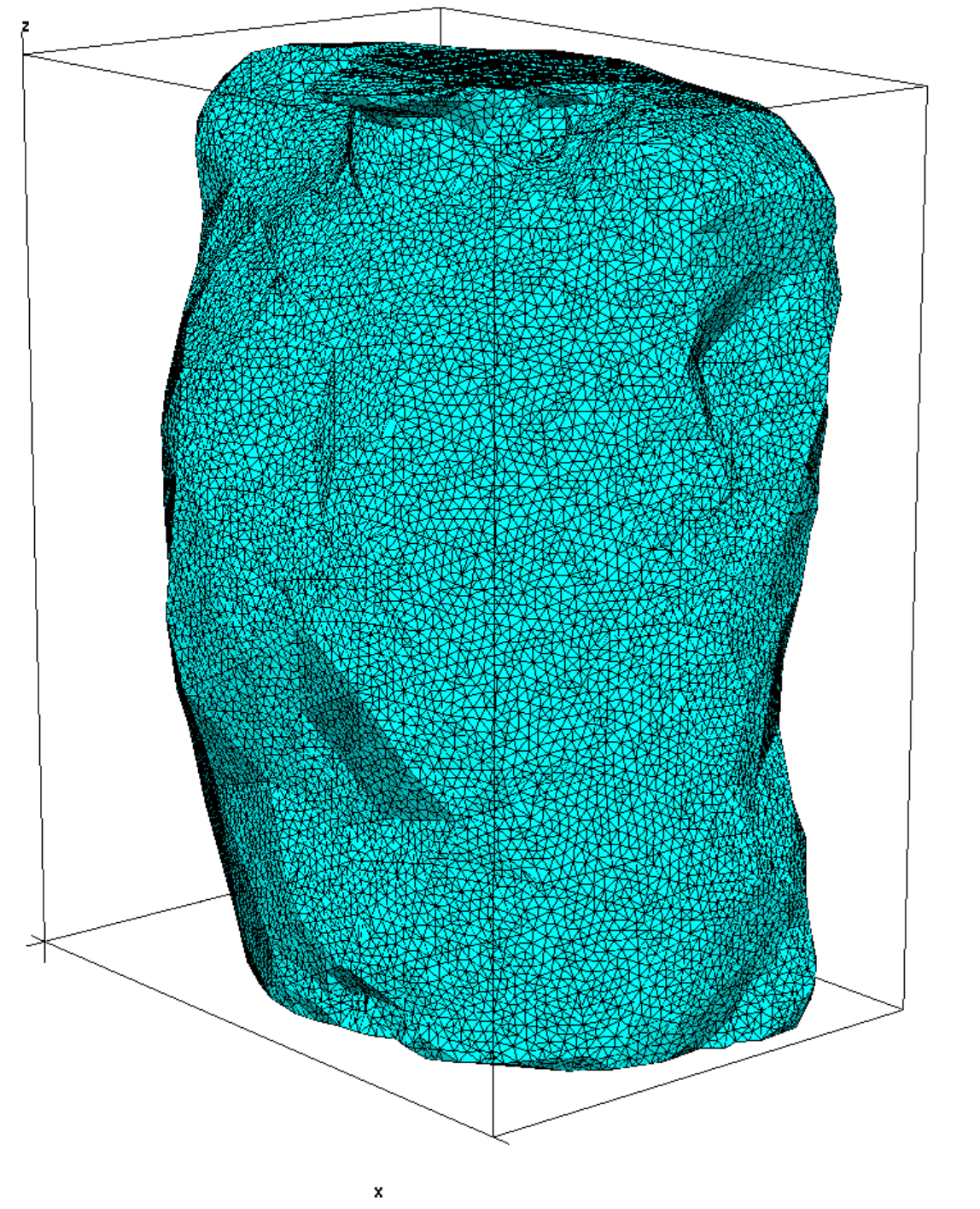
Tetrahedral mesh of a human chest
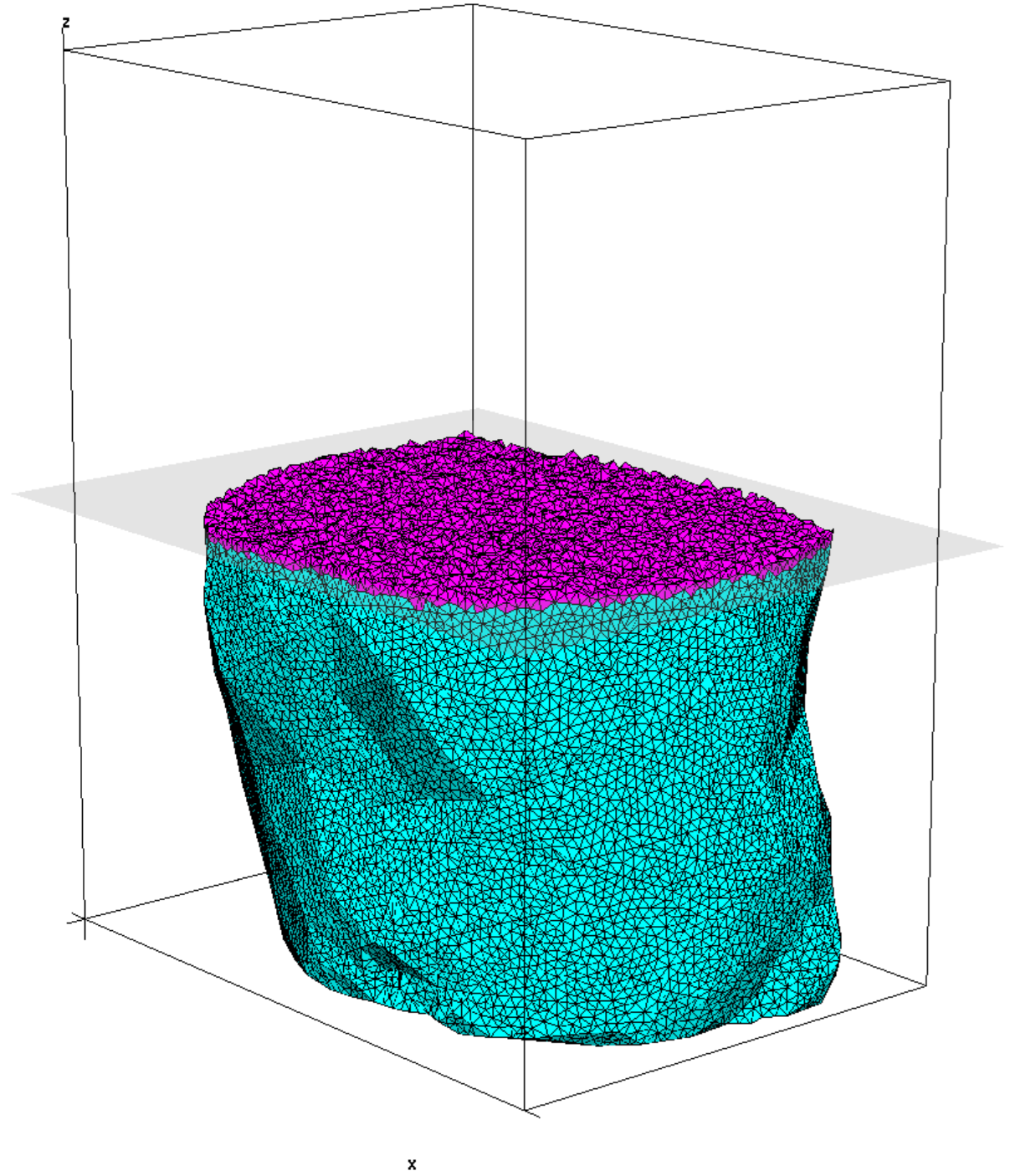
Cross section of tetrahedral mesh of a human chest
Challenge
Your task is to utilize ParFEMWARP to warp meshes within two simulations. We have already provided the C++ MPI code and Makefile mesh for each simulation in ParFEMWARP/examples/breathing1 and ParFEMWARP/examples/breathing2. The mesh is located in ParFEMWARP/examples/meshes. You are required to provide specific findings for each simulation in: 1) a report and 2) supplementary documents. Please contact Abir Haque either via Discord or email with any questions.
Simulation 1: breathing1 - 50 points
Simulation 1 is simulating 16 deformations of a human chest. You are provided code to read and deform the mesh in ParFEMWARP/examples/breathing1. First, perform strong scaling tests on your system on a single node. Second, perform strong scaling tests on your system using multiple nodes. Average runtime across multiple trails is ideal. However, capturing a single runtime from a single trial for each core-configuration is acceptable.
Provide the following items in your report: 1) single node strong scaling speedup plots for each stage of ParFEMWARP (i.e. neighbor list precomputation, global stiffness matrix generation, sum of all user-supplied deformations, and sum of all linear solutions), (8 points) 2) multi-node strong scaling speedup plots for each stage of ParFEMWARP (8 points), 3) single node speedup plot for the entirety of ParFEMWARP (8 points), 4) multi-node speedup plot for the entirety of ParFEMWARP (8 points), 5) the best runtime overall for any core-configuration you choose (10 times the ratio of your team's runtime versus the best runtime across all teams, 10 points total), and 6) comments and conclusions about the scaling pattern for each stage of ParFEMWARP and the overall method (8 points).
Provide the following items in your supplementary item: 1) scripts and/or commands and 2) terminal output from ParFEMWARP for each trial. Failure to provide terminal output for all trials will drop your score to 0 out of 50 points for this simulation.
Simulation 2: breathing2 - 50 points
Simulation 2 is simulating 480 deformations of a human chest. You are provided code to read and deform the mesh in ParFEMWARP/examples/breathing2. You are only expected to perform this simulation once using the most optimal configuration you believe your system can provide with at least 2 nodes.
Provide the following item in your report: 1) runtime for the neighbor list generation stage (10 points), 2) runtime for the global stiffness matrix generation stage (5 points), 3) average runtime for each linear solution stage (15/480 points per deformation, 15 points total), 4) total deformations completed (15/480 points per deformation, 15 points total), and 5) runtime of the overall method (5 times the ratio of your team's runtime versus the best runtime across all teams, 5 points total).
Provide the following item in your supplementary item: 1) scripts and/or commands used to execute ParFEMWARP and 2) terminal output from ParFEMWARP for the simulation. Failure to provide terminal output for the simulation will drop your score to 0 out of 50 points for this simulation.
Rules
- No modifications to source code are allowed (i.e. any .cpp or .hpp file).
- Modifications to only Makefiles within ParFEMWARP are allowed.
- No modifications to input meshes are allowed.
- Failure to provide terminal output for any simulation will drop your score to 0 out of 50 points for that simulation.
- Incomplete runs of simulations will grant partial credit based of how many stages and deformations have been completed.
- All official runs performed by ParFEMWARP must run locally. This means on your competition hardware. You are free to execute unofficial runs on any device, including your laptop.
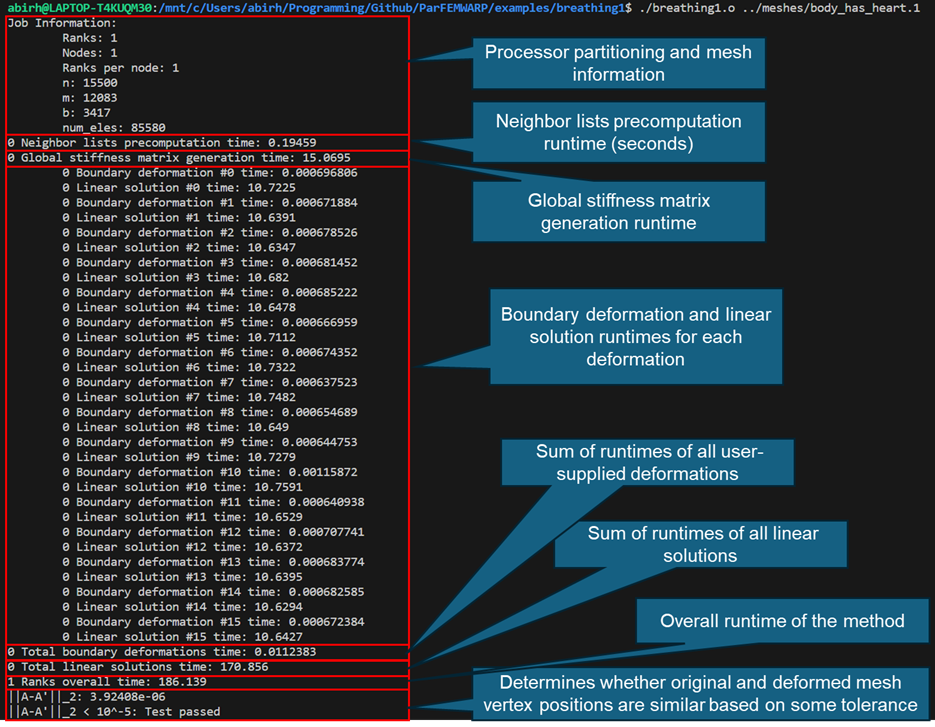
Example output of performing Simulation 1 via ParFEMWARP with 1 core (i.e. serially)
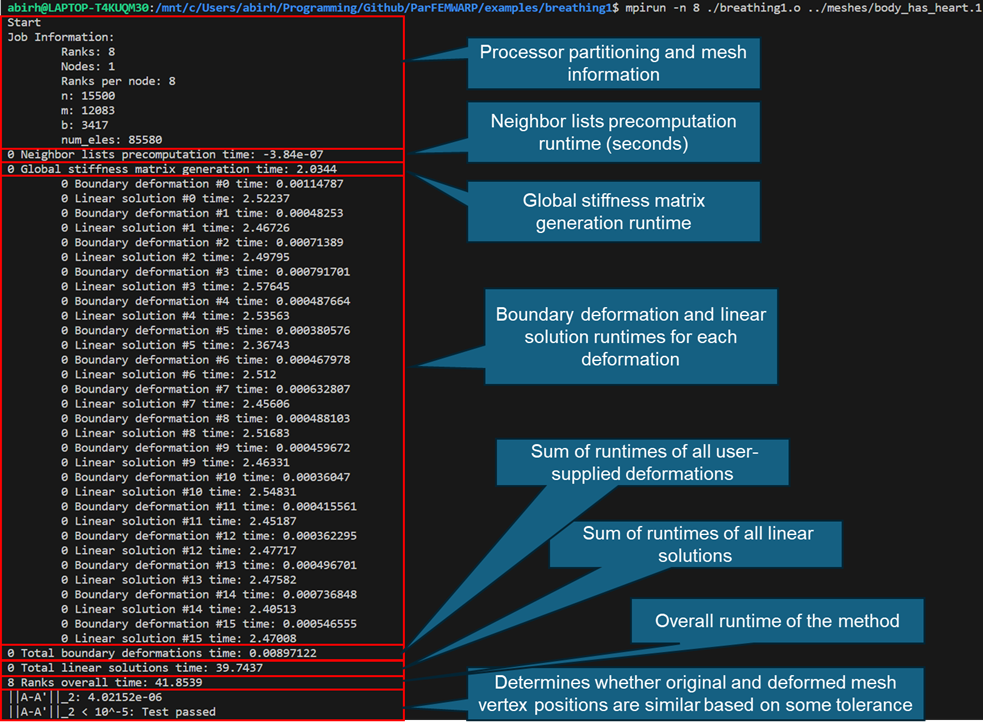
Example output of performing Simulation 1 via ParFEMWARP with 8 cores on 1 node
Systems Overview
Systems interview was added as another part of the competition. This was a late add, so it will be judged warmly.
Topics discussed will be the design, infrastructure, management, and other details that have gone into building and maintainging your system. Additionally, talking about the problems encountered along the way can be very telling of the effort behind the cluster.
Interviews will be around 10-15 minutes.
Log Submission
Compress the paths where logs are often stored, usually just /var, from the head/login/main compute nodes. If your team believes that the logs after a certain number of nodes is too similar, exclude them. This means if you feel that node 1, node 2, node 3 have the most distinct logs, but the following nodes 4---12 nodes are just a repetition of the first 3 logs, just exclude them. We will ask for these files to be submitted at the end of the competition.
Create a folder called Logs/ in your google drive and place them there.
Make sure to send a picture of your team with the cluster to the committee as well. This can be a possible location to put it.
The log submission does not receive points, but is is required to have some record of the clusters.
Grading Breakdown
The overall score for any individual team will be measured as follows with individual application scores being weighted against the team who scores the highest for that given application, i.e. if the highest benchmark result for HPL is 160 GFLOP/s the scores for every other team will be 10*(their score)/ (160 GFLOP/s).
| Application | Weight | Normalized |
|---|---|---|
| HPL | 10.8% | x |
| STREAM | 10.8% | x |
| DLLAMA | 16.2% | |
| Hashcat | 26.1% | x |
| Mystery App | 26.1% | x |
| Systems | 10% | |
| Total | 100% | x |
🏆 SBCC25 Final Results
Below are the top 3 teams in each category, along with their respective scores:
🔢 HPL (High Performance Linpack)
- 🥇 Texas Tech – 10.8
- 🥈 UCSD T1 – 6.640
- 🥉 UCSD T2 – 2.429
🧠 STREAM
- 🥇 Aalborg U – 10.8
- 🥈 UCSD T1 – 0.00128
- 🥉 UCSD T2 – 0.00045
🦙 DLLAMA
- 🥇 UCSD T1 – 13.835
- 🥈 UCSD T2 – 13.379
- 🥉 Texas Tech – 7.938
🔐 HASHCAT
- 🥇 UCSD T1 – 26.10
- 🥈 UCSD T2 – 23.25
- 🥉 Texas Tech – 16.87
🧮 ParFEMWARP
- 🥇 U of Kansas – 26.10
- 🥈 UCSD T1 – 25.457
- 🥉 Texas Tech – 25.042
🖥️ Systems
- 🥇 UCSD T2 – 9
- 🥈 UCSD T1 – 8
- 🥈 Clemson – 8
🏁 Overall Standings (Total Score)
- 🥇 UCSD T1 – 80.03
- 🥈 Texas Tech – 67.65
- 🥉 UCSD T2 – 67.10